

The Role of IT Support. Every business that handles sensitive data – whether customer records, financial transactions or employee information – must follow regulations designed to protect this information and maintain ethical business practices. However, keeping up with evolving compliance requirements can be challenging, especially as technology advances and cyber threats become more sophisticated.
IT support plays a crucial role in helping businesses stay compliant with industry regulations and legal requirements. From data protection laws to financial security standards, IT providers ensure that companies have the right security measures, policies and systems in place to meet these obligations. Without expert guidance, businesses risk costly fines, legal action and reputational damage that could significantly impact their operations.
Table of Contents
What is the Role of IT Support?
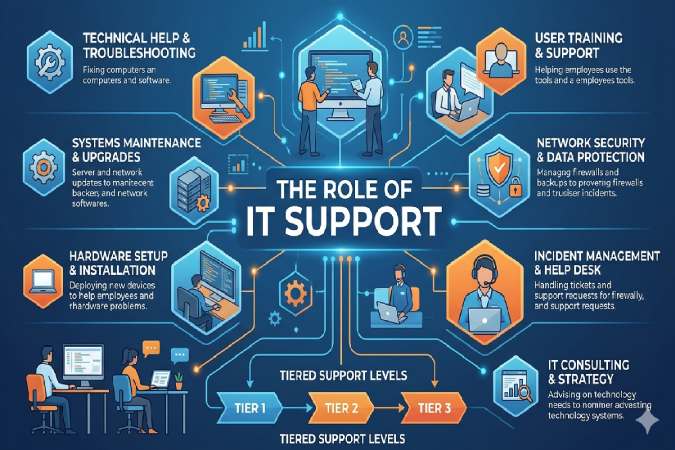
IT support pros troubleshoot hardware, software, networks, and user issues to ensure seamless operations. They act as the first line of defense against tech disruptions, from password resets to server crashes.
In small firms, one person might handle it all; enterprises tier it into levels for efficiency. Daily, they install software, monitor systems, and train users—reducing frustration and boosting productivity.
Evolution in Modern Business
From reactive fixes in the 90s to proactive AI-monitored systems today, IT support now integrates with cybersecurity and cloud ops. In 2026, with remote work standard, they manage VPNs and zero-trust access seamlessly.
IT Support Levels Explained (L1 to L3)
Support tiers prevent chaos by escalating issues logically. L1 handles 70-80% of tickets quickly.
Level 1: Help Desk Basics
Entry-level L1 (help desk) resets passwords, guides software installs, and logs tickets via tools like Zendesk. Example: User can’t access email? Verify credentials, check basics—resolve in minutes or escalate.
Focus: Volume, speed (aim <5 min response).
Level 2: Technical Troubleshooting
L2 dives deeper: Diagnose network lags, update drivers, configure permissions. Example: Slow Wi-Fi? Ping tests, VLAN checks, remote desktop fixes—often involves vendor liaison.
Requires OS/network certs; resolves 15-20% complex issues.
Level 3: Advanced Engineering
L3 experts handle root causes: Server migrations, patch rollouts, disaster recovery. Example: Ransomware hit? Isolate, restore backups, analyze logs for prevention.
Strategic: Designs scalable infra, mentors juniors.
Key Responsibilities Across Roles
Core duties span levels but scale in complexity.
Daily Tasks and Duties
- Respond to tickets, diagnose hardware/software faults.
- Install/configure systems, perform backups/updates.
- Monitor performance, enforce security patches.
- Train users, document solutions for knowledge base.
Example: Morning huddle reviews overnight alerts; afternoon field repairs printers.
Technical vs Soft Skills
Tech: Windows/Linux, TCP/IP, Active Directory. Soft: Patience explaining jargon-free, multitasking 20+ tickets.
Business Benefits of Strong IT Support
Downtime costs $5k-10k/min for midsize firms—solid support slashes it 50%.
Efficiency and Cost Savings
Proactive monitoring cuts unplanned outages; automation tickets free time for strategy. Case: Retailer with L2 support reduced checkout crashes, boosting sales 15%.
Security and Compliance
Patch vulnerabilities, train on phishing—prevents breaches (average $4.5M cost). GDPR/HIPAA? They audit logs, ensure compliance.
Required Skills and Qualifications
Start with high school + CompTIA A+; advance to Network+/Security+.
Bachelor’s in IT helpful for L3. Experience: L1 (0-2 yrs), L2 (2-5), L3 (5+).
Hands-on: Shadow a helpdesk, volunteer fixes.
Career Path in IT Support
Progression Table
| Level | Experience | Salary (India, ₹/yr) | Next Step |
| L1 Help Desk | 0-2 yrs | 3-6L | L2 certs |
| L2 Tech Support | 2-5 yrs | 6-12L | SysAdmin |
| L3 Engineer | 5+ yrs | 12-25L+ | IT Manager |
Global: US $45-80k; UK £25-50k. Upskill via Coursera/Google IT certs.
Future Trends Shaping IT Support (2026+)
AI chatbots handle L1 (e.g., ServiceNow); pros focus on strategy. Remote tools boom, cybersecurity mandatory amid rising threats.
Zero-trust models, edge computing—adapt or lag.
Outsourced? Vs in-house: Cost savings but less control—hybrid wins for SMBs.
Strong IT support isn’t overhead—it’s revenue protector. Invest now for 2026 resilience.
Essential skills required for IT Support professionals
IT support professionals need a mix of technical know-how and people skills to handle everything from crashed laptops to frustrated users effectively. Mastering these essentials sets you up for success in helpdesk roles or beyond, especially in fast-paced 2026 environments with remote work and AI tools.
Technical Skills
These form the backbone—focus on hands-on troubleshooting across systems.
- Hardware and Software Troubleshooting: Diagnose issues like faulty RAM, driver conflicts, or app crashes using tools like Event Viewer or safe mode. Example: A printer won’t connect? Check USB ports, update firmware, test network sharing.
- Operating Systems Proficiency: Master Windows (Active Directory), macOS, and Linux basics—install updates, manage users, configure peripherals.
- Networking Fundamentals: Understand TCP/IP, DNS, DHCP, Wi-Fi setups; ping tests for connectivity woes. Vital for hybrid offices.
- Cybersecurity Basics: Spot phishing, apply patches, use antivirus like Endpoint Detection tools; enforce MFA and firewalls.
- Remote Support Tools: Excel in TeamViewer, AnyDesk, or RDP for fixing issues off-site without travel.
Soft Skills
Tech alone won’t cut it—users need clear guidance under stress.
- Communication: Explain fixes in simple terms (no jargon); document tickets thoroughly for handoffs. Example: “Your email’s down because of a full inbox—let’s clear 5GB.”
- Problem-Solving and Critical Thinking: Break issues into steps: Reproduce, isolate cause, test fixes. Think like a detective.
- Customer Service and Patience: Stay calm with repeat callers; empathize to build trust. Aim for first-contact resolution.
- Time Management: Juggle 20+ tickets via tools like Zendesk; prioritize by impact (e.g., CEO outage first).
Emerging Skills for 2026
Stay ahead with these as AI handles basics.
| Skill | Why It Matters | How to Build |
| Scripting/Automation (PowerShell, Python) | Automate password resets or log analysis | Free Codecademy courses |
| Cloud Basics (AWS, Azure) | Support SaaS like Office 365 migrations | Google Cloud free tier |
| Ticketing Systems | ServiceNow/Zendesk for SLAs | YouTube tutorials |
| Data Backup/Recovery | Ransomware defense plans | Practice with Veeam |
How to Develop These Skills
Start with CompTIA A+ certification (covers 70% of L1 needs). Practice via home labs (VirtualBox VMs), volunteer IT for friends, or Google IT Support Certificate on Coursera. Entry-level roles value eagerness over perfection—highlight projects on resumes.
Prioritize troubleshooting and communication—they resolve 80% of daily tickets and keep users happy.
FAQ SECTION
What is the main role of IT support?
IT support troubleshoots hardware/software/networks, provides user help, maintains systems, and prevents downtime to keep businesses efficient.
What are the differences between L1, L2, and L3 IT support?
L1 handles basic tickets like passwords; L2 advanced troubleshooting; L3 root causes and infrastructure design.
Does IT support require coding skills?
No for core roles, but scripting (Python/Bash) helps automation; focus on troubleshooting certs like CompTIA A+.
What salary can I expect in IT support?
India: ₹3-25L by level; US: $45-80k. Varies by experience/location.
Why is IT support important for business?
Prevents costly downtime, boosts security, enhances productivity—e.g., quick fixes save thousands per incident.
What certifications for IT support career?
CompTIA A+/Network+, Microsoft MCSA, Google IT Support—essential for entry/mid-level.
In-house vs outsourced IT support—which is best?
In-house for control/custom; outsourced for cost/scalability—hybrid suits SMBs in 2026.
What are daily IT support responsibilities?
Ticket resolution, updates/backups, user training, monitoring—reactive and proactive.
Final Thoughts
The Role of IT Support. Meeting compliance and regulatory requirements is not just about avoiding penalties – it’s about protecting your business, your customers and your reputation. As cyber threats and data privacy concerns continue to grow, businesses must take a proactive approach to compliance. IT support providers offer the expertise, security strategies and ongoing monitoring needed to ensure businesses remain compliant and secure in an ever-changing regulatory landscape.
Partnering with an experienced IT support provider ensures that your business has the right systems in place to manage compliance effectively. From implementing security measures to conducting audits and training employees, IT providers help businesses navigate complex regulations with confidence.
To find the best IT support provider in your area, do some research with a keyword search to get the names of reputable and recommended companies. For example, try “IT compliance support Plymouth” or “cybersecurity and regulatory IT services Bristol” to find a company near you.
Speak to them about your organisation’s digital needs and explore how they can help you develop a strategy tailored to your business.