

Table of Contents
Defining IT Infrastructure in Simple Terms
IT infrastructure is the collection of hardware, software, networks, and services that power your business operations. It’s everything from the laptops your team uses to the cloud storage where you keep client files, the Wi-Fi network connecting your office, and the security systems protecting your data.
Think of IT infrastructure as the digital nervous system of your business. Just as your body needs a healthy nervous system to function, your business needs reliable IT infrastructure to operate efficiently, communicate effectively, and serve customers successfully.
How IT Infrastructure Drives Business Success
Proper IT infrastructure delivers tangible business benefits that directly impact your bottom line:
Productivity Gains: The right tools enable employees to work efficiently from anywhere. Studies show that implementing appropriate IT solutions can boost employee productivity by 25% or more.
Customer Satisfaction: Fast, reliable systems mean you can serve customers promptly and professionally. When your technology works seamlessly, your customers notice.
Competitive Advantage: Modern IT infrastructure enables small businesses to compete with larger competitors. Cloud tools, collaboration platforms, and automation level the playing field.
Cost Efficiency: Contrary to popular belief, strategic IT investments reduce long-term costs. Businesses utilizing cloud computing save an average of 20% on annual IT spending compared to traditional on-premises approaches.
Business Continuity: Robust backup systems and disaster recovery plans protect against data loss, ensuring you can recover quickly from unexpected events.
The Cost of Getting It Wrong
The consequences of inadequate IT infrastructure extend beyond occasional inconveniences:
- 60% of small companies go out of business within six months of a cyber attack or data breach
- Average downtime costs small businesses 25,620 per hour)
- Data loss incidents cost small businesses an average of $18,000 per event
- Poor technology experiences drive 40% of customers to competitors
These statistics underscore a crucial reality: skimping on IT infrastructure is a false economy. The question isn’t whether you can afford proper infrastructure—it’s whether you can afford not to have it.
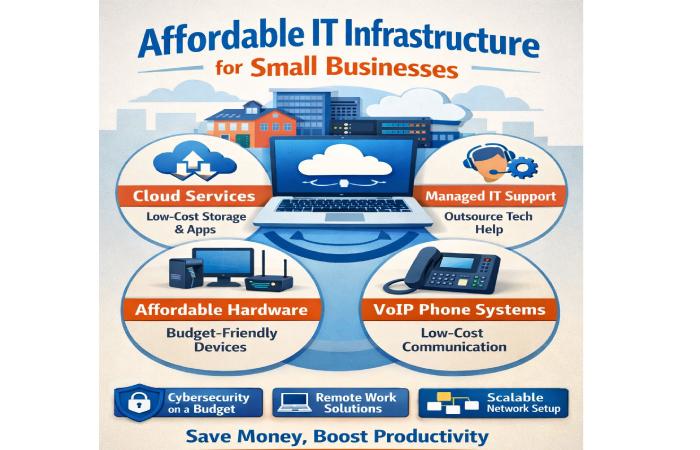
Essential Components of Small Business IT Infrastructure
Every effective IT infrastructure consists of six core components. Understanding these building blocks helps you prioritize investments and make informed decisions.
Hardware (Computers, Servers, Devices)
Hardware forms the physical foundation of your IT infrastructure.
Workstations (Laptops/Desktops): Modern small businesses typically choose laptops for flexibility. Budget $600-1,200 for quality business-grade laptops with i5/Ryzen 5 processors, 16GB RAM, and 512GB SSD storage. Consumer-grade equipment may seem cheaper initially, but business-grade hardware offers better keyboards, longer warranties, and management features that justify the modest premium.
Servers: Most small businesses can avoid physical servers entirely by using cloud services. However, businesses with specific performance requirements or regulatory constraints may need on-premises servers ($3,000-20,000 depending on capacity).
Mobile Devices: If employees use smartphones or tablets for work, implement mobile device management (MDM) to secure company data. Most cloud platforms include basic MDM at no additional cost.
Network Infrastructure (Internet, Wi-Fi, Routers)
Your network infrastructure connects everything together and enables communication.
Business Internet Connection: Choose business-class internet service from a reliable ISP. Minimum 100 Mbps for 5-10 employees, 200+ Mbps for larger teams or video conferencing-heavy work. Budget $100-300/month depending on speed and location.
Backup Internet Connection: A second internet connection from a different provider prevents total downtime. Budget $50-150/month for a backup line.
Business-Grade Wi-Fi: Consumer routers can’t handle business demands. Invest in business-grade access points like Ubiquiti UniFi (150-400) that offer centralized management, separate guest networks, and enterprise security.
Firewall: Every business network needs a hardware firewall between the internet and internal network. Options range from 2,000+ (enterprise-grade like Fortinet FortiGate).
Software and Applications
Software enables your team to perform work and collaborate effectively.
Operating Systems: Windows or macOS for workstations (typically included with hardware purchase).
Productivity Suite: Microsoft 365 Business Basic (6/user/month) provide email, office applications, video conferencing, and cloud storage.
Business-Specific Applications: CRM systems (HubSpot Free or Zoho CRM 30/month or Xero 7/user/month).
Cloud Services and Storage
Cloud computing has revolutionized small business IT by eliminating expensive hardware while providing enterprise-grade capabilities.
Email and Collaboration: Google Workspace or Microsoft 365 provide email, calendars, video conferencing, chat, and file storage starting at $6/user/month.
File Storage and Sharing: Most businesses can rely on storage included with their email platform (30GB-1TB per user). For additional needs, services like Dropbox Business (17/user/month) offer extended storage.
Cloud Backup: Essential for data protection. Backblaze (50/year per computer) provide automated cloud backup.
Cybersecurity Solutions
Security is non-negotiable in today’s threat landscape.
Multi-Factor Authentication (MFA): Free with most cloud platforms. Implement immediately on all accounts.
Business Antivirus: Deploy endpoint protection on all devices. CrowdStrike Falcon Go (6-8/device/month), or Bitdefender GravityZone ($3-5/device/month).
Password Manager: Company-wide password managers like Bitwarden Teams (8/user/month) eliminate weak passwords and password reuse.
DNS Filtering: Services like Cloudflare Gateway (free for small teams) or Cisco Umbrella ($3/user/month) block malicious websites before employees can access them.
Firewall and VPN: Hardware firewall (mentioned above) plus VPN capability for secure remote access.
Data Backup and Disaster Recovery
The 3-2-1 backup rule: 3 copies of data, on 2 different media types, with 1 offsite.
Cloud Backup: Automated backup of all business-critical data to cloud storage (mentioned in Cloud Services).
Local Backup: External hard drives or NAS (Network Attached Storage) devices for fast local recovery. Budget $200-1,500.
Disaster Recovery Plan: Document how to recover from various scenarios (ransomware, hardware failure, natural disaster). Test restoration procedures monthly—an untested backup isn’t a backup.
How Much Does IT Infrastructure Cost for Small Businesses?
Understanding IT Budget Guidelines (2-7% of Revenue)
Industry benchmarks suggest small businesses should allocate 2-7% of annual revenue to IT, with the percentage varying based on industry and technology dependency:
- Low-tech industries (construction, retail): 2-4%
- Medium-tech industries (professional services, healthcare): 4-6%
- High-tech industries (software, digital marketing): 6-10%
Example: A 20,000-30,000 annually for IT (4-6% of revenue).
One-Time Setup Costs vs. Recurring Expenses
Initial Setup (One-Time Costs):
- Laptops/workstations: $600-1,200 per employee
- Network equipment (firewall, Wi-Fi): $500-2,000
- Initial software licenses: $500-2,000
- Professional setup services: $1,000-5,000
- Total for 10-person company: $10,000-20,000
Recurring Monthly/Annual Costs:
- Internet service: $150-400/month
- Cloud services (email, storage): $6-15/user/month
- Business software: $50-200/month
- Security tools: $5-15/user/month
- Backup services: $50-200/month
- IT support (if outsourced): 75-125/hour as needed
- Total for 10-person company: 9,600-48,000/year)
Budget Breakdown by Business Size
Micro Business (1-5 employees):
- Setup: $3,000-8,000
- Monthly: $300-1,500
- Annual: $6,600-26,000
Small Business (5-20 employees):
- Setup: $10,000-25,000
- Monthly: $1,500-5,000
- Annual: $28,000-85,000
Growing Business (20-50 employees):
- Setup: $25,000-60,000
- Monthly: $4,000-12,000
- Annual: $73,000-204,000
Hidden Costs to Watch For
Don’t let these common hidden expenses catch you off guard:
- Software license increases as you add users
- Hardware replacement cycles (laptops every 3-5 years)
- Training time for new systems (lost productivity)
- Integration costs between different platforms
- Upgrade fees when you outgrow current plans
- Emergency IT support when problems arise
- Compliance requirements (security audits, certifications)
Cloud vs. On-Premises Infrastructure: Which is More Affordable?
Cloud infrastructure means your data and applications run on third-party servers accessed via the internet.
Financial Advantages:
- No large upfront hardware investment (typical on-premises server: $10,000-50,000)
- Predictable monthly expenses that scale with usage
- No maintenance costs (provider handles updates, patches, hardware)
- Pay only for what you use (scale up during busy seasons, down during slow periods)
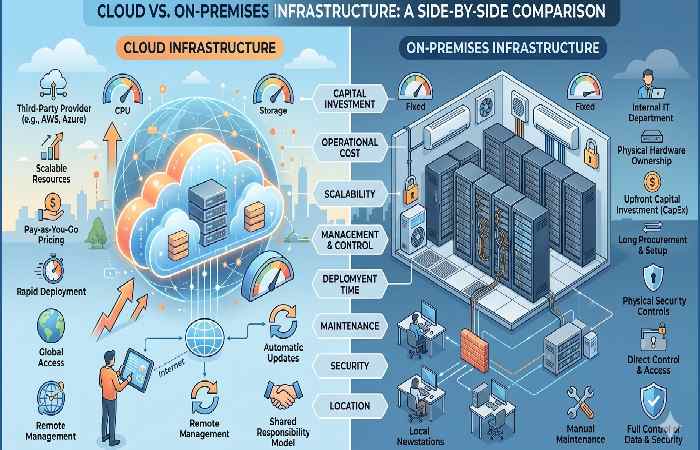
Cost Example (10-employee company):
- Microsoft 365 Business Basic: $60/month
- Cloud storage (additional): $50/month
- Cloud backup: $70/month
- Total: 2,160/year)
Compare this to purchasing and maintaining physical servers, which would cost 2,000-5,000 annually for maintenance, electricity, and eventual replacement.
Additional Benefits:
- Access from anywhere (essential for remote work)
- Automatic updates and security patches
- Built-in redundancy and disaster recovery
- Enterprise-grade security infrastructure
On-Premises Infrastructure: When It Makes Sense
Some businesses still benefit from on-premises infrastructure:
When On-Premises Makes Sense:
- Strict data residency requirements (regulated industries)
- Very high-volume data processing (where cloud costs exceed on-premises)
- Extremely poor or unreliable internet connectivity
- Specialized applications that don’t support cloud deployment
Reality Check: For 90% of small businesses, cloud infrastructure is more affordable and appropriate. The remaining 10% have specific requirements that justify on-premises investment.
Hybrid Approach: Best of Both Worlds
Many businesses adopt a hybrid model:
- Core business applications in the cloud (email, collaboration, CRM)
- Specialized or performance-critical systems on-premises
- Local caching for frequently-accessed files
This approach provides cloud benefits while addressing specific on-premises needs.
Total Cost of Ownership Comparison (5-Year)
Cloud Infrastructure (10-employee company):
- Year 1: 15,000 services = $17,500
- Years 2-5: 60,000
- 5-Year Total: $77,500
On-Premises Infrastructure (10-employee company):
- Year 1: 5,000 setup + 28,000
- Years 2-4: 9,000
- Year 5: 3,000 maintenance = $18,000
- 5-Year Total: $55,000
BUT: On-premises doesn’t include:
- Remote access solutions ($3,000-8,000)
- Dedicated IT staff or consultant time (10-20 hours/year at 5,000-10,000)
- Electricity, cooling, and physical space (7,500)
- Disaster recovery site/backup (10,000)
Adjusted On-Premises Total: $77,500-90,500
When you account for hidden costs, cloud and on-premises reach cost parity, but cloud offers significantly better flexibility, security, and user experience.
Managed IT Services vs. DIY: What’s Right for Your Budget?
What Managed IT Services Include
Managed Service Providers (MSPs) handle your entire IT infrastructure for a predictable monthly fee:
- 24/7 monitoring and maintenance
- Help desk support for employees
- Security management and updates
- Backup and disaster recovery
- Strategic planning and consulting
- Hardware and software procurement
- Vendor management
Managed Services Pricing Models
Per-User Monthly Fee: Most common model. $95-295/user/month depending on service level:
- Basic ($95-145/user): Help desk, monitoring, basic security, backup
- Standard ($145-195/user): Above plus proactive management, patch management, advanced security
- Comprehensive ($195-295/user): Above plus strategic consulting, 24/7 support, compliance assistance
Hourly Break-Fix: Pay as you go: $75-150/hour
- Pros: Only pay when you need help
- Cons: Unpredictable costs, reactive (not proactive)
Hybrid Model: Combination of flat monthly fee for basics plus hourly for projects: 100/hour
When DIY Makes Financial Sense
Consider handling IT yourself if:
- You have 5 or fewer employees
- At least one person has strong technical skills
- You’re using primarily cloud-based tools
- Your budget is extremely constrained (under $500/month for IT)
- Your technology needs are simple and stable
DIY Cost Reality (10-employee company):
- Your time managing IT: 10-20 hours/month
- Opportunity cost if that’s owner/manager time: $500-4,000/month
- Emergency issues and downtime: $2,000-5,000/year
- Effective cost: $8,000-50,000/year
Managed Services Cost (same company):
- 10 users × 1,450/month
- Annual cost: $17,400/year
For many small businesses, managed services actually cost less than effective DIY when you account for time, expertise, and downtime prevention.
Hybrid Support Options
Many businesses start with a hybrid approach:
- Handle day-to-day basics internally
- Engage MSP for strategic planning, security, and complex projects
- Access on-demand help desk for employees
This approach costs $500-1,500/month and provides professional expertise while keeping some control in-house.
How to Prioritize IT Spending on a Limited Budget
When budget constraints force difficult choices, prioritize investments that deliver the highest value and mitigate the greatest risks.
Non-Negotiable Essentials (Must-Have First)
Phase 1: Core Foundation (500-1,500/month)
- Business-grade internet connection ($100-200/month)
- Cloud email and collaboration platform ($6/user/month)
- Basic hardware (laptops: $600-800/user)
- Multi-factor authentication (free with cloud platforms)
- Cloud backup ($7/computer/month)
- Basic antivirus ($3-5/user/month)
- Password manager ($4/user/month)
- Basic firewall ($200-400 one-time)
Why These First: These components prevent business-stopping disasters. Without reliable internet, email, backups, and basic security, you can’t operate safely or serve customers effectively.
Important But Can Wait (Phase 2)
Phase 2: Enhanced Protection and Productivity (300-800/month)
- Backup internet connection ($50-100/month)
- Advanced endpoint protection (upgrade from basic antivirus)
- Business-grade Wi-Fi system ($300-600 one-time)
- VPN for remote access ($50-100/month or included with firewall)
- Business applications (CRM, project management: $20-50/user/month)
- Local backup device (NAS: $300-800 one-time)
Implementation Timing: Add these within 3-6 months or when reaching 5-10 employees.
Nice-to-Have Enhancements (Phase 3)
Phase 3: Optimization and Growth (200-500/month)
- Managed IT services (vs. DIY)
- Advanced security tools (SIEM, EDR, security training platform)
- Unified communications system (advanced phone system)
- Collaboration enhancements (project management tools, document automation)
- Business intelligence tools (analytics, reporting)
- Upgraded hardware (faster computers, additional monitors)
Implementation Timing: Add these after 12+ months or when reaching 15-20 employees.
Affordable Security Solutions for Small Business IT
Security cannot be an afterthought. 60% of small businesses that experience a cyber attack go out of business within six months. Fortunately, essential security doesn’t require enterprise budgets.
Essential Security Measures (MFA, Firewalls, Antivirus)
Multi-Factor Authentication (MFA): Cost: Free with most platforms The single highest-impact security measure. MFA blocks 99.9% of automated attacks. Enable on:
- Email accounts
- Cloud storage
- Banking and financial systems
- CRM and business applications
- Admin/owner accounts (use physical security keys like YubiKey for $40 each)
Hardware Firewall: Cost: $200-2,000 one-time Essential barrier between your network and the internet. Minimum features: stateful inspection, intrusion detection/prevention (IDS/IPS), VPN support, content filtering.
Endpoint Protection (Antivirus): Cost: $3-10/device/month Modern endpoint protection goes far beyond traditional antivirus, including: malware protection, ransomware prevention, exploit prevention, behavior monitoring. Deploy on every device—computers, servers, and ideally mobile devices.
DNS Filtering: Cost: Free-$3/user/month Blocks access to malicious websites before they load. Cloudflare Gateway (free for small teams) or Cisco Umbrella provide excellent protection.
Email Security: Cost: Included with business email or $2-5/user/month Microsoft 365 and Google Workspace include spam filtering and basic threat protection. For enhanced protection, add services like Mimecast or Barracuda.
Employee Security Training
Cost: Free-$5/user/month
Technology alone cannot secure your business. 95% of security breaches involve human error. Essential training topics:
- Recognizing phishing emails
- Creating and managing strong passwords
- Identifying suspicious links and attachments
- Reporting security concerns
- Safe use of public Wi-Fi
- Physical security (locking computers, securing documents)
Free resources: KnowBe4 free phishing simulator, NIST cybersecurity training, manufacturer security awareness materials.
Paid platforms: KnowBe4 (30/user/year), Proofpoint ($35/user/year).
Minimum Requirement: Monthly 10-minute security awareness sessions covering one specific topic.
Backup and Disaster Recovery Planning
Cost: $50-300/month for 10-person company
Backups protect against ransomware, hardware failure, accidental deletion, and natural disasters.
3-2-1 Backup Rule:
- 3 copies of important data
- 2 different storage media types
- 1 copy stored offsite
Implementation:
- Primary: Cloud backup service (Backblaze 50/year/computer)
- Secondary: Local backup to external hard drive or NAS device ($200-800 one-time)
- Test restoration monthly — untested backups aren’t backups
Disaster Recovery Plan: Document in writing:
- What data is critical
- Where backups are stored
- How to restore from backup
- Who is responsible for recovery
- Emergency contact information
- Alternative work arrangements
Budget-Friendly Security Tools
Complete Security Stack for 10-Person Company:
- MFA: Free (included with cloud platforms)
- Hardware firewall: $300 one-time (Ubiquiti Dream Machine)
- Endpoint protection: $50/month (Bitdefender GravityZone)
- Password manager: $40/month (Bitwarden Teams)
- DNS filtering: Free (Cloudflare Gateway)
- Cloud backup: $70/month (Backblaze)
- Security training: Free (DIY monthly sessions)
Total: 160/month
This comprehensive security posture costs less than fixing a single security incident.
Planning for Growth: Scalable Infrastructure on a Budget
Building Flexibility into Your Infrastructure
Smart infrastructure planning accounts for growth without overinvestment today.
Scalable Choices:
- Cloud services automatically scale with user count (add licenses as you hire)
- Subscription software eliminates large upfront investments
- Modular network equipment allows adding capacity without replacing everything
- Virtual servers scale resources without purchasing new hardware
Questions to Ask Vendors:
- How easily can we add users?
- Are there volume discounts for larger teams?
- Can we upgrade plans without data migration?
- What’s the cost to add capacity?
- Do you offer educational pricing or startup discounts?
When and How to Upgrade
Indicators It’s Time to Upgrade:
- Regular performance complaints from employees
- Security vulnerabilities in outdated systems
- Insufficient capacity during peak periods
- Vendor ends support for current version
- New features provide significant business value
Upgrade Prioritization:
- Security patches: Apply immediately when released
- Hardware at end-of-life: Replace laptops/equipment after 4-5 years
- Software versions: Upgrade when current version loses support
- Capacity increases: Add when consistently hitting 80% utilization
Budget-Friendly Upgrade Strategies:
- Stagger laptop replacements (replace 20-25% annually instead of all at once)
- Use manufacturer refurbished equipment (30-50% savings with warranty)
- Take advantage of vendor promotions and educational discounts
- Negotiate multi-year contracts for better pricing
Avoiding Over-Investment
Resist the temptation to buy what you “might need someday.”
Common Over-Investment Mistakes:
- Purchasing high-end hardware for basic tasks
- Buying server capacity for “future growth” that’s 5+ years away
- Subscribing to software plans with features you won’t use for years
- Over-provisioning bandwidth you don’t need today
Smart Approach:
- Buy for today + 12 months of anticipated growth
- Choose solutions that scale gradually (cloud services are perfect for this)
- Review utilization quarterly and adjust subscriptions
- Implement “just in time” purchasing for new employees
Exception: Security tools warrant full investment immediately—don’t compromise security for uncertain future savings.
Common Mistakes Small Businesses Make with IT Infrastructure
Learning from others’ mistakes saves money and headaches.
Underinvesting in Security
The Mistake: Viewing security as optional or “we’re too small to be targeted.”
The Reality: 43% of cyber attacks target small businesses, and automated attacks don’t discriminate by size. The average cost of a data breach for small businesses is $200,000.
The Fix: Treat security as non-negotiable. Even on the tightest budget, implement MFA, backups, antivirus, and employee training. These basics cost $200-500/month and prevent disasters costing tens of thousands.
Choosing Consumer-Grade Equipment
The Mistake: Buying consumer laptops, routers, and software to save money upfront.
The Reality: Consumer equipment lacks business-essential features (management capabilities, longer warranties, better support), fails faster, and costs more to maintain long-term.
The Fix: Invest in business-grade equipment. The 20-30% premium pays for itself in reliability, longevity, and reduced support costs. For a 5-year lifespan, the annual cost difference is minimal.
Neglecting Backup and Recovery
The Mistake: “We’ll set up backups eventually” or relying solely on cloud sync (Dropbox, OneDrive) without proper backup.
The Reality: Cloud sync is not backup—if ransomware encrypts files, it syncs the encrypted versions. 93% of companies that lose their data for 10+ days file for bankruptcy within one year.
The Fix: Implement 3-2-1 backup immediately. Cloud backup services cost $7-15/device/month and automatically protect everything. Test restoration monthly—if you’ve never restored a file, you don’t have a working backup.
Failing to Plan for Growth
The Mistake: Buying infrastructure that exactly fits today’s needs with no room for growth, or conversely, massively over-provisioning for uncertain future needs.
The Reality: Inflexible infrastructure requires expensive rip-and-replace when you grow. Over-provisioned infrastructure wastes capital that could drive growth.
The Fix: Choose scalable solutions (cloud services, subscription software) that grow with you. Plan for 12 months of anticipated growth, not 5 years. Reassess quarterly.
Not Documenting Systems and Passwords
The Mistake: Keeping IT information in one person’s head or scattered across sticky notes and text files.
The Reality: When that person leaves or is unavailable during an emergency, you’re locked out of critical systems. Password reset procedures can take days, and undocumented configurations slow troubleshooting.
The Fix:
- Use a company password manager to securely store all credentials
- Document network configurations, vendor accounts, and license information
- Create basic runbooks for common tasks
- Review and update documentation quarterly
Emergency Access: Ensure at least two people have master password manager access and critical account recovery information.
Frequently Asked Questions
Q: What percentage of revenue should small businesses spend on IT infrastructure?
Industry benchmarks suggest 2-7% of annual revenue, depending on your industry’s technology dependence. Low-tech industries (construction, retail) typically spend 2-4%, while medium-tech businesses (professional services, healthcare) allocate 4-6%, and technology-dependent businesses (software, digital marketing) invest 6-10%. A 20,000-30,000 annually for IT. This includes hardware, software, cloud services, security, support, and maintenance.
Q: Is cloud infrastructure really more affordable than on-premises for small businesses?
Yes, for 90% of small businesses, cloud infrastructure is more cost-effective when you account for total costs. While on-premises servers appear cheaper initially, the total 5-year cost including hardware replacement, maintenance, electricity, IT management time, disaster recovery, and remote access capabilities makes cloud and on-premises nearly equal. Cloud infrastructure offers significantly better flexibility, automatic updates, built-in security, and remote access—making it the better value for most small businesses. The exceptions are businesses with strict data residency requirements or extremely high-volume data processing needs.
Q: Can I set up IT infrastructure myself or should I hire a managed service provider?
You can handle IT yourself if: you have fewer than 5 employees, someone on your team has strong technical skills, you’re using primarily cloud-based tools, and you can dedicate 10-20 hours monthly to IT management. However, when you account for your time’s opportunity cost (2,000-5,000/year), effective DIY costs often exceed managed services. Most businesses with 10+ employees find managed IT services ($95-295/user/month) more affordable and reliable than DIY. A hybrid approach—handling basics internally while outsourcing security, complex projects, and strategic planning—works well for budget-conscious businesses.
Conclusion: Taking Action on Your IT Infrastructure
Building affordable IT infrastructure doesn’t require unlimited budgets or enterprise resources. With strategic planning and informed decision-making, small businesses can establish robust technology foundations that support growth, protect against threats, and enable competitive advantage.